Virtual Mirror and AR: Try Before You Buy in Your Shopify App

Ahasna Rathnakoon
Read more
Swetha Nethmi
•

If you run a Shopify store, you’ve probably thought about launching your own mobile app. After all, customers spend far more time shopping on their phones than on desktop computers. Having a dedicated app can increase repeat purchases, improve customer loyalty, and boost conversions.
The good news? You don’t need to hire a developer, learn coding, or spend months building an app.
With Moby5, you can turn your Shopify store into a fully functional iOS and Android app in just 5 minutes.
A mobile app offers several advantages over a standard website:
Faster loading and smoother navigation
One-tap checkout
Push notifications for promotions and abandoned carts
Higher customer retention
Better shopping experience
Apps help your store stay on your customers’ phones, making it easier for them to return and purchase again.

Building a custom mobile app usually requires:
Hiring iOS and Android developers
Designing app screens
Connecting Shopify APIs
Testing and fixing bugs
Submitting to app stores
This process can take months and cost thousands of dollars.

Moby5 is a no-code platform that instantly converts your Shopify store into a native mobile app.
No coding. No developers. No technical setup.
Simply connect your Shopify store, customize your design, and publish your app.


Log in to your Shopify admin dashboard and install Moby5 from the Shopify App Store. Once installed, Moby5 appears as a plugin inside your Shopify admin panel.
Open Moby5 and enter your business details, including:
Company name
Contact email
Phone number
App name
This information is used to create your branded mobile app.
Select a professionally designed app theme and customize it to match your brand.
You can:
Choose a theme layout
Set primary and secondary colors
Adjust fonts and styling
Configure advanced design settings
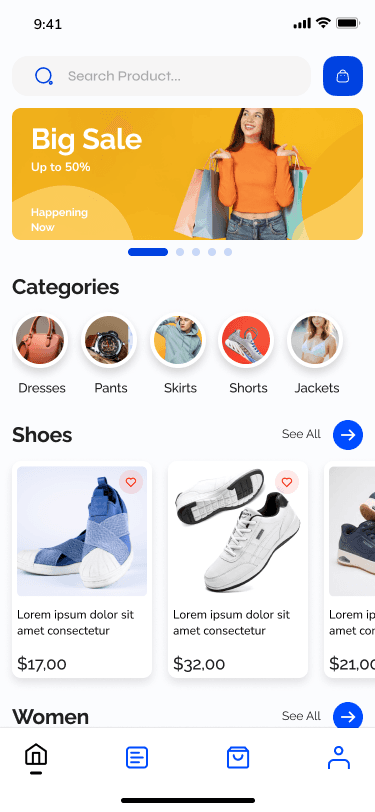
Design your app’s home screen by adding:
Hero banners
Top collections
Featured products
Sorting options
Layout styles such as horizontal, vertical, or grid
This allows you to create a shopping experience that reflects your brand.
After completing your configurations, Moby5 generates a live preview of your app.
To view it:
Download the Moby5 preview app on your phone.
Open the app and tap Connect My Store.
Scan the QR code displayed in your Shopify dashboard.
Instantly preview your branded app on iPhone or Android.
This lets you test the full shopping experience before moving on to app store publishing.
Real-time Shopify synchronization
Native iOS and Android apps
Unlimited push notifications
Custom design options
Fast checkout experience
Multi-language and currency support
Analytics and performance tracking
Push notifications remind customers about new arrivals, flash sales, and special offers.
Customers are more likely to return when your app is installed on their phones.
Native apps provide a smoother shopping experience and faster checkout.
Your own branded app creates trust and credibility.
Moby5 is ideal for:
Fashion and apparel stores
Beauty and cosmetics brands
Health and supplement businesses
Electronics retailers
Home and lifestyle brands
Compared to custom development, Moby5 offers a cost-effective subscription model, making mobile commerce accessible to businesses of all sizes.
Launch in minutes instead of months
No coding required
Affordable pricing
Expert onboarding support
Designed specifically for Shopify
You no longer need a developer to create a professional mobile shopping app for your Shopify store.
With Moby5, you can turn your store into a fully branded mobile app in just 5 minutes and start increasing conversions, customer loyalty, and repeat sales.
Ready to launch your app? Visit Moby5 and get started today.