Virtual Mirror and AR: Try Before You Buy in Your Shopify App

Ahasna Rathnakoon
Read more
Ahasna Rathnakoon
•

If you run a physical shop alongside your Shopify store, you've probably noticed that the two can feel like separate businesses. Customers who visit in person may never see your online range, and online shoppers may not know your shop exists.
Your app can be the bridge between them. One feature that helps is a built in barcode scanner, which is included in Moby5 Pro and above.
Here's how a barcode scanner in your app can connect in store and online shopping, with practical ideas for putting it to work.
Today's shoppers move between channels without thinking about it. They might:
When your channels work together, every visit strengthens the relationship. When they don't, you miss chances to keep customers engaged.
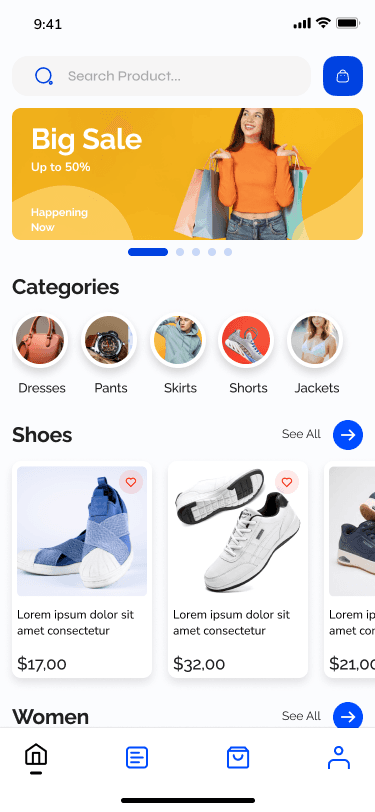
With a barcode scanner built into your app, customers can use their phone's camera to scan products. That gives shoppers a quick way to bring a physical product into your app experience, without typing a search.
A built in scanner can help customers look up a physical product if its barcode is mapped correctly to the corresponding Shopify product or variant. Confirm barcode compatibility and camera permissions before launch.
In a busy shop, customers don't always want to wait for help. Scanning a product lets them look it up in your app, where they can see the details you've added to your Shopify catalogue.
A customer isn't ready to buy today? Once they've found the product in your app, they can add it to their wishlist and come back to it when they're ready.
If a scanned barcode maps to a Shopify product or variant, shoppers may be able to check related online variants; availability must be verified for each inventory location.
For repeat purchases, a working barcode lookup could help shoppers find a product again; test supported barcode formats before presenting it as a universal reordering path.
Once a customer is looking at a product in the app, recommendations can introduce them to items that go with it.
An app can create another way to stay in touch with in store shoppers who choose to install it and enable notifications.
After customers install the app and opt in, you can use Moby5's advertised push features to share relevant arrivals, restocks and events, subject to platform delivery and store configuration.
Moby5 advertises real time Shopify sync of products and inventory, but the information displayed can still depend on correct catalogue data, location settings, connection health and update delays.
Keep your Shopify catalogue tidy. Clear product names, good photos and complete descriptions make every scan more useful.
Tell customers about it. Many people won't know the feature exists unless you point it out.
Train your team. Staff who understand the app can recommend it naturally.
Start with your best sellers. Make sure your most popular products have strong listings in the app.
Measure the impact. Moby5 Pro includes an analytics dashboard and conversion tracking to help you see how your app is performing.
Retailers with large catalogues where variants matter, like sizes and shades
Brands at pop ups, markets or events that want to stay in touch with visitors
The built in barcode scanner is included in Moby5 Pro and above, alongside features like multi language and multi currency support, segmented push campaigns and analytics.
It's most useful for stores with a physical presence, such as a shop, pop up or market stall, but any brand whose products customers handle in person can find ways to use it.
Make it easy and worthwhile. Display a QR code at the counter, offer an app exclusive reward for downloading in store and ask your team to mention the app at checkout. Once customers have the app, you can stay in touch with free push notifications.
Moby5 advertises real time synchronization with Shopify; check product mappings and location specific inventory to ensure the app displays the intended price and stock information.
Your physical shop and your online store shouldn't feel like two separate businesses. A built in barcode scanner in your app gives customers an easy way to move between them, and gives you the chance to keep in touch with in store shoppers long after they leave.
Bring your shop and your app together. The built in barcode scanner is included with Moby5 Pro and above.