Virtual Mirror and AR: Try Before You Buy in Your Shopify App

Ahasna Rathnakoon
Read more
Ahasna Rathnakoon
•

Think about the moment a customer opens your app. They've chosen to be there. Nobody dragged them in with an ad; they tapped your icon because they wanted to see what you have.
App open is an opportunity to present a relevant message, but it is not necessarily the moment of highest purchase intent for every shopper.
Pop up banners at app open let you do exactly that. Here's how they work in a Moby5 app and how to use them without annoying your customers.
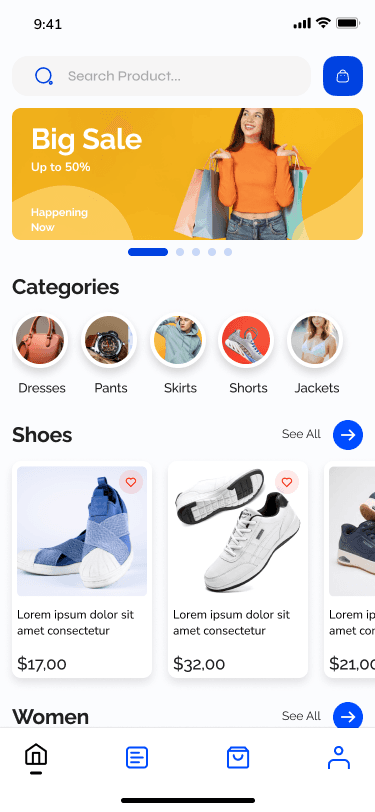
An in app pop up banner is a message displayed in the app, often at opening or another configured moment. It may announce new products, a sale or a relevant offer.
Moby5's in app campaigns page advertises app open pop up banners that can promote offers and product drops, direct shoppers to products or collections, and be scheduled or updated without coding.
Opening an app indicates some interest in the brand, but a shopper may be checking an order, searching for information or browsing without an immediate plan to buy.
Launching a new range? Make it the first thing app users see, with a tap straight through to the collection.
For brands that release limited drops, a banner at app open builds excitement and sends shoppers straight to the products before they sell out.
A banner can make a flash sale more visible to users who open the app while it is active, but it does not guarantee every shopper will see or act on it.
Remind shoppers why the app is the best place to shop with offers only available there.
Holidays, festivals and gift giving seasons are perfect for banners that guide shoppers to curated collections or gift ideas.
Let loyal customers know about rewards or early access they've unlocked.
Don't try to say everything at once. One clear message, one clear action.
Tell shoppers exactly what to do: "Shop the collection", "Get early access", "Claim your offer". Make the button easy to tap.
A great product image or campaign graphic will grab attention far better than text alone.
Link banners to the relevant product or collection when supported, then test the route on each platform so shoppers do not have to search again.
A banner shoppers have already seen five times becomes wallpaper. Change it regularly. Moby5 lets you swap campaigns without coding, so updating is quick.
Moby5 lets you schedule banner campaigns ahead of time. That means you can:
Push notifications can invite eligible shoppers into the app; pop up banners can reinforce the same campaign after they open it. Neither automatically guarantees attention or conversion.
Push notification: "Our new collection drops at 7pm. App users get first access."
Pop up banner at app open: Shows the new collection with a "Shop now" button.
Checkout: give interested shoppers a clear path to review and complete their order.
Each step supports the next, giving shoppers a smooth path from notification to purchase.
Pop ups can become annoying if they're too frequent or irrelevant. A few guidelines help:
Moby5 Pro advertises analytics and conversion tracking. Check whether banner level attribution is available in your reporting setup before claiming that each banner's sales impact can be isolated.
An in app campaign is a promotion or customer message presented inside the app. Moby5 advertises pop up banners, app exclusive offers and an AI chatbot; confirm which features are enabled in your plan.
Yes. Moby5 lets you schedule banner campaigns and swap them in and out without any coding, so you can plan launches and sales ahead of time.
A push notification reaches shoppers outside the app to bring them in. A pop up banner greets them once they've opened the app. They work best together as part of the same campaign.
Update banners when a campaign ends or content becomes stale. Choose the frequency based on campaign timing and user feedback rather than an arbitrary two week rule.
Relevant in app banners can highlight launches and offers while shoppers use the app. Keep them easy to dismiss and assess whether they improve discovery without interrupting important tasks.
Make your next launch impossible to miss. Explore Moby5 in app campaigns or compare plans.