Lalana Gurusinghe
•
July 21, 2026
You did everything right.
Your product photos are sharp. Your copy is clean. Your ads are converting. Someone lands on your store, browses, adds items to cart, and then… silence.
They’re gone.
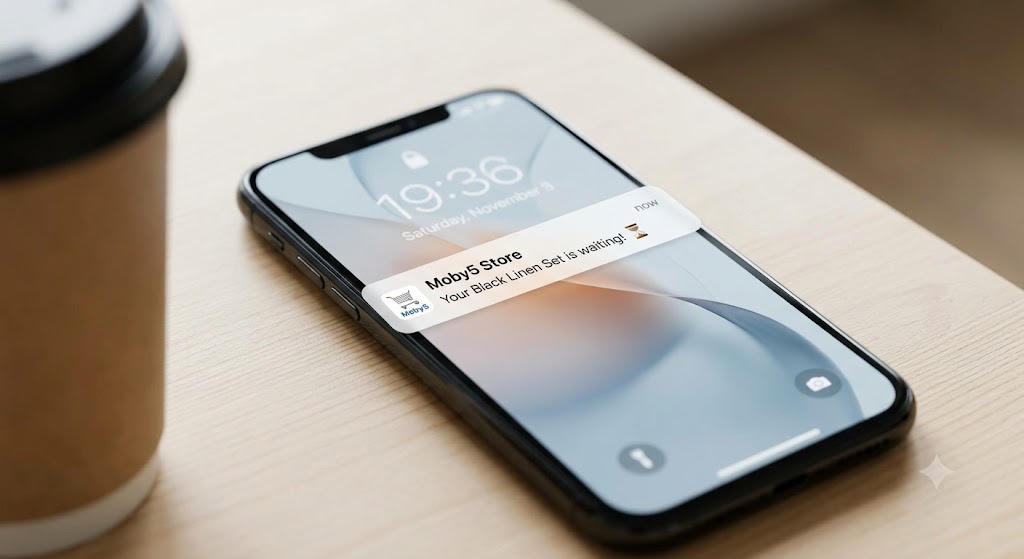
Studies across 50 different datasets put the average cart abandonment rate at 70.22%. That means seven out of every ten people who add something to your cart walk away without buying. And if you’re selling on mobile, it gets worse. The cart abandonment rate on mobile devices hits a staggering 85.65%. Baymard, ClickPost
Here’s what most Shopify merchants don’t realise: those customers didn’t leave because they stopped wanting the product. They got distracted. Their phone buzzed. Life happened.
The brands winning on mobile know this. And they use push notifications to bring those customers back before the moment is gone.
This is the complete guide to doing exactly that.
Why Email Alone Isn’t Enough Anymore
If your cart recovery strategy is just an email sequence, you’re leaving serious money on the table.
Email is great for storytelling, nurturing, and broad campaigns. But for cart recovery, timing is everything. And email is slow.
The average marketing email open rate sits between 18% and 25%. Abandoned cart push notifications, browse abandonment alerts, and back-in-stock triggers convert at 22.9% according to Omnisend’s 2025 data. That’s roughly 3 to 4 times the conversion rate of automated email flows. Mobiloud
Push notifications land on the lock screen. No inbox to compete with. No spam folder. No subject line A/B testing required. The message just shows up, right when your customer has their phone in their hand.
Transactional push notifications average a 69% open rate. And 48% of users say they have made a purchase as a result of getting a push notification. Mobiloud
That’s not a marginal improvement. That’s a different channel entirely.
The Cart Recovery Window Nobody Talks About
There’s a window after someone abandons a cart where they’re still warm. They remember the product. They haven’t bought it somewhere else yet. The intent is there.
That window closes fast.
Within the first hour, your chances of recovery are at their peak. After 24 hours, you’re competing with every other brand fighting for their attention. After 48 hours, most of those customers have moved on entirely.
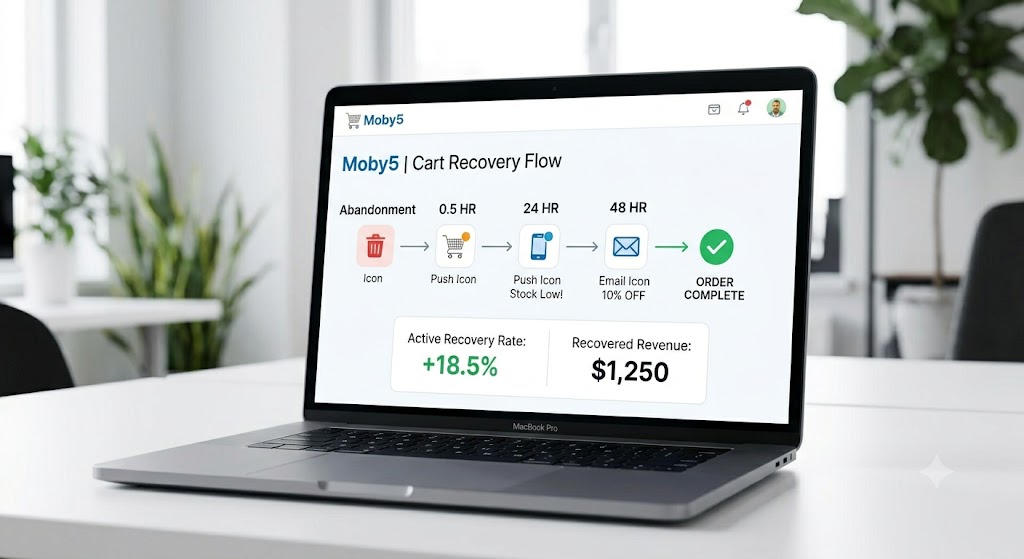
This is why push notifications beat email for cart recovery. An email might land in an inbox at 2am and get buried by morning. A push notification fires within minutes of abandonment, when the customer is still on their phone, still thinking about what they almost bought.
The brands that win this game set up automated push flows that trigger in three stages:
Notification 1, within 30 to 60 minutes — A simple reminder. No pressure, no discount. Just a nudge that their cart is waiting.
Notification 2, within 24 hours — Add some context. Mention that stock is limited, or that the item has been popular. Create a reason to act.
Notification 3, within 48 hours — This is where you bring the incentive. A discount code, free shipping, or a bundle offer. But only for customers who haven’t converted from the first two.
You only discount when you have to. Not upfront, not by default.
What Your Push Notifications Should Actually Say
Most merchants overthink the copy and underinvest in the timing. The truth is that a well-timed average notification beats a beautifully written one that shows up two days late.
That said, the words do matter. Here’s what works:
Keep it short — Keep titles under 35 characters and body text under 50 characters for optimal mobile viewing. People are glancing at their lock screen, not reading an essay. Alexander Jarvis
Be specific — “Your cart is waiting” is weak. “The Black Linen Set you wanted is almost gone” is what stops the scroll.
Use the product name — Personalised notifications that reference what the customer actually added convert significantly better than generic reminders.
Add urgency honestly — If something is genuinely low in stock, say so. If there’s a real deadline on an offer, include it. Don’t manufacture urgency on every message; your customers will notice and stop trusting the signal.
One clear action — Your notification should have one job: get the tap. Deep link it directly to the cart, not the homepage, not a collection page. The fewer steps between notification and checkout, the higher your recovery rate.
The Timing Patterns That Actually Work
Strategic timing during peak hours, specifically 12 to 1 PM and 6 to 8 PM, can significantly boost open rates. Alexander Jarvis
But don’t just set it and forget it. Your customers have their own patterns. A B2B buyer behaves differently from a fashion shopper browsing at midnight. Build your sequences around when your specific audience is active, not a generic best practice from a blog post.
A few patterns worth testing:
The lunch window — Midday pushes work well for impulse categories like food, accessories, and lifestyle products. People are on their phones, mentally taking a break.
The evening scroll — 7 to 9 PM is when most people decompress with their phones. This window converts particularly well for fashion, home decor, and beauty.
The next-morning follow-up — If someone abandoned at 11 PM, hitting them again at 8 AM when they’re starting their day can be more effective than an immediate follow-up in the middle of the night.
Be careful with frequency though. 46% of users will opt out of push notifications if they receive 2 to 5 messages in a single week. Every opt-out is a permanent loss of that channel for that customer. Respect the relationship. Mobiloud
Segmenting Your Cart Recovery by Customer Type
Not every abandoned cart is the same situation.
A first-time visitor who added a single item to check the price is very different from a loyal customer who had $200 in their cart before their phone died. Sending them the same recovery notification is a wasted opportunity.
Segment at minimum by:
New vs. returning customers — A returning customer who has bought before needs a different message than someone who has never purchased. For returning customers, lean into the relationship — “Welcome back” feels good. For new customers, lean into trust signals.
Cart value — High-value carts justify a more generous recovery incentive. A cart sitting at $15 probably doesn’t need a 20% discount. A cart at $300 might.
Product category — A customer who abandoned skincare products responds to different copy than someone who left gym equipment behind. Write to the specific desire, not to the abstract idea of completing a purchase.
Browsing behaviour — Did they visit the product page multiple times before adding to cart? That’s high intent. Did they add on first visit and immediately bounce? That’s window shopping. Treat them differently.
Why You Need a Mobile App to Make This Work
Here’s where a lot of Shopify merchants hit a wall.
Web push notifications exist, and they’re better than nothing. But they have real limitations. Browser support is inconsistent. iOS Safari only recently added web push, and the opt-in rates are nowhere near what native apps achieve.
Push notifications have an average opt-in rate of 67.5% on Android and 51.4% on iOS for native apps. On web push, you’re fighting much lower opt-in rates and losing iOS users almost entirely. FlareLane Blog
Native app push notifications land reliably. They show up on the lock screen, in the notification centre, and can include images, product thumbnails, and action buttons right in the notification itself. Rich push notifications average a 56% higher open rate than standard ones. Mobiloud
If you don’t have a mobile app, you don’t have a real push notification strategy. You have a workaround.
This is exactly the gap that Moby5 was built to close. The platform lets you turn your Shopify store into a fully native mobile app without touching a line of code. And push notifications, including automated cart recovery sequences, come built in from day one.
Your cart recovery flows sync with your Shopify data in real time. When a customer abandons a cart, the trigger fires. When they come back and complete the purchase, the sequence stops automatically. You don’t manage it manually. You set it up once and it runs.
The Push Notification Stack for Maximum Recovery
Here’s what a complete cart recovery stack looks like when it’s working properly:
Push as the primary recovery channel — Fast, high-visibility, and free to send. This is your first line of recovery within the first hour.
Email as the follow-up — If the customer doesn’t convert from push, email catches them in a more considered moment. Use it for storytelling, social proof, and the incentive offer.
Retargeting as the safety net — Retargeting ads reduce cart abandonment by 6.5% and boost ecommerce sales by 20%. Not every customer will opt into push or open email. Retargeting ads keep your brand visible while they browse elsewhere. ClickPost
Running all three doesn’t mean being aggressive. It means being present in the right place at the right moment depending on where your customer is in their day.
What Good Recovery Numbers Look Like
If you’re setting this up for the first time, here’s what you should aim for:
Push notification open rate for cart recovery — 20% to 35%. This is well above the general ecommerce benchmark and achievable with good segmentation.
Recovery rate from a well-built push sequence — up to 20% of abandoned carts. A push notification lands on the lock screen minutes after a customer leaves their cart, costs nothing to send, and can recover up to 20% of abandoned carts. At scale, this single use case can justify the cost of an app on its own. Mobiloud
If your numbers are below this range, the issue is usually one of three things: notifications are firing too late, the copy is too generic, or the deep link is sending customers to the wrong page.
Fix those three things before testing anything else.
Getting Started Without Overcomplicating It
You don’t need a complex 12-step automation on day one.
Start with one notification. Set it to trigger 45 minutes after a cart is abandoned. Write a single line of direct, specific copy. Deep link it to the cart. Measure the conversion rate for two weeks.
Then add the second notification at 24 hours. Then the third at 48 hours with a small incentive.
Build the sequence based on what your data tells you, not what a template told you to do.
Moby5 makes this straightforward for Shopify merchants. You connect your store, and the cart abandonment triggers are ready to configure. You don’t need a developer. You don’t need to wrestle with third-party integrations. The app is native, the push notifications are built in, and the recovery flows connect directly to your live Shopify data.
The setup takes less time than you think. The revenue impact starts from the first recovered cart.
The Honest Bottom Line
Ecommerce retailers lose approximately $18 billion annually due to abandoned carts. That number sounds abstract until you calculate what it means for your specific store. Ringly
Take your monthly revenue. Estimate your abandonment rate. Even recovering 10% of those carts changes the picture.
Push notifications are not a silver bullet. They work when the timing is right, the copy is specific, and the experience on the other end of the tap is frictionless. Get all three right and you stop watching revenue walk out the door.
Your customers wanted to buy. Give them a reason to come back.
Start your free trial at Moby5 and set up your first cart recovery notification today.
Related articles

What is M-Commerce? Why Your Shopify Store Needs a Dedicated App

Swetha Nethmi
July 20, 2026
Read more
Stop Paying for SMS: How Free Push Notifications Change E-Commerce Marketing
Swetha Nethmi
July 20, 2026
Read more

Real-Time Shopify Sync: The Growth Lever Most Brands Ignore

Lalana Gurusinghe
July 20, 2026
Read more